
How CQRS and MediatR Enhance ASP.NET Core Web API Architecture?
As applications evolve from simple CRUD systems into large, business-critical platforms, maintaining clean architecture becomes increasingly challenging. Over time, developers often face bloated controllers, tightly coupled services, and domain models that try to handle both read and write operations. This complexity makes systems difficult to maintain, test, and scale.
CQRS (Command Query Responsibility Segregation), combined with MediatR, offers a structured and scalable solution to these problems. By separating read and write responsibilities and introducing a mediator to decouple components, CQRS enables cleaner code, better separation of concerns, and improved long-term maintainability.
In this article, we’ll explore:
- What CQRS is and why it matters
- When CQRS should be used
- How MediatR supports CQRS
- A step-by-step implementation in ASP.NET Core Web API
Best practices and architectural trade-offs
What Is CQRS?
CQRS stands for Command Query Responsibility Segregation.
It is a design pattern that separates read operations (queries) from write operations (commands).
Core Principle
- Commands change application state (Create, Update, Delete)
- Queries retrieve data and never modify state
In traditional CRUD applications, the same model is often used for both reading and writing. While this works for small systems, it quickly becomes problematic as complexity grows.
Why CQRS Exists
Using a single model for both reads and writes often leads to:
- Overloaded domain models
- Complex DTO mappings
- Security risks due to over-exposed data
- Limited performance optimization
CQRS allows each side to evolve independently, improving clarity, security, and scalability.
When Should You Use CQRS?
CQRS is not a silver bullet and should not be used everywhere.
CQRS Is a Good Fit When:
- Business logic is complex
- Read and write workloads differ significantly
- The system requires strong validation and workflows
- Multiple teams work on the same domain
- Long-term scalability is important
Avoid CQRS When:
- The application is small or short-lived
- CRUD operations are straightforward
- Simplicity is more important than flexibility
Good rule: If your application is simple today but guaranteed to grow, CQRS is worth considering.
What Is MediatR?
MediatR is a lightweight .NET library that implements the Mediator pattern.
Instead of components calling each other directly, they communicate through a mediator. This eliminates tight coupling and improves testability.
Benefits of MediatR
- Decouples controllers from business logic
- Encourages single-responsibility handlers
- Simplifies cross-cutting concerns (logging, validation)
- Improves maintainability and readability
MediatR works in-process, making it ideal for clean application architectures.
CQRS and MediatR Together
CQRS defines what operations exist (commands and queries).
MediatR defines how those operations are dispatched and handled.
| CQRS Concept | MediatR Component |
|---|---|
| Command | IRequest |
| Query | IRequest<TResponse> |
| Command Handler | IRequestHandler |
| Query Handler | IRequestHandler |
| Domain Event | INotification |
| Cross-cutting logic | IPipelineBehavior |
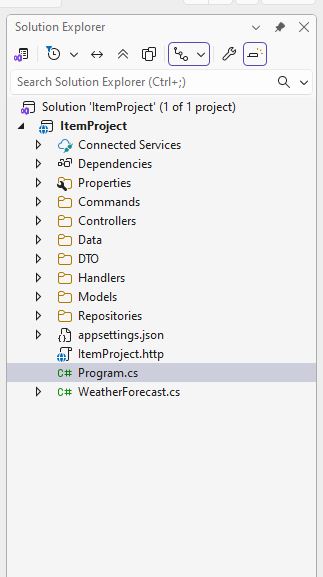
Recommended Project Structure
├── Controllers
├── Commands
├── Queries
├── Handlers
├── Models
├── DTOs
├── Data
├── Repositories
This structure:
- Keeps responsibilities isolated
- Scales well as the application grows
- Aligns with Clean Architecture principles
High-Level Implementation Flow
- Controller receives HTTP request
- Command or Query is created
- MediatR dispatches the request
- Handler executes business logic
- Repository/Data layer persists or fetches data
- Response is returned to the controller
Controllers remain thin, and business logic lives in handlers.
Advanced MediatR Capabilities
Notifications (Domain Events)
Notifications allow multiple handlers to react to the same event.
Common use cases:
- Sending emails
- Invalidating caches
- Publishing integration events
This enables event-driven behavior without tight coupling.
Pipeline Behaviors
Pipeline behaviors act like middleware for MediatR requests.
Typical scenarios:
- Validation (FluentValidation)
- Logging
- Authorization
- Performance tracking
They provide a clean way to handle cross-cutting concerns without duplicating code.
CQRS Trade-Offs
Advantages
- Clear separation of concerns
- Highly testable architecture
- Easier long-term maintenance
- Scales well with complexity
Challenges
- More files and abstractions
- Steeper learning curve
- Overkill for simple CRUD apps
CQRS is an architectural investment, not a shortcut.
CQRS in Microservices
CQRS fits naturally into microservices architectures.
- MediatR handles in-process CQRS
- Message brokers (Kafka, Azure Service Bus) handle cross-service events
- Commands and queries can evolve independently
- Event-driven systems become easier to manage
CQRS becomes especially powerful when combined with event-based communication.
A step-by-step implementation in ASP.NET Core Web API
Model (Domain Entity) – Models/Project.cs
DTO (Request & Response) – DTO/CreateProjectRequest.cs ,DTOs/ProjectResponse.cs
namespace ProjectDemo.DTOs
{
    public class ProjectResponse
    {
        public int Id { get; set; }

        public string Name { get; set; } = null!;

        public string Description { get; set; } = null!;
    }
}
Database Context – Data/AppDbContext.cs
Repository Layer
IProjectRepository.cs ,
ProjectRepository.cs
Command (Write Operation) – Commands/CreateProjectCommand.cs
Command Handler – Handlers/CreateProjectHandler.cs
Controller (API Endpoint) – Controllers/ProjectsController.cs
Enable CORS (IMPORTANT) – Program.cs
appsettings.json
Request /Response Example (POST)
Request
Response
Conclusion
CQRS combined with MediatR provides a clean, scalable, and maintainable architecture for modern ASP.NET Core Web APIs. By separating read and write concerns and introducing a mediator, applications become easier to evolve, test, and reason about.
While CQRS should not be applied prematurely, it becomes invaluable as systems grow in complexity. When used thoughtfully, it lays a strong foundation for enterprise-grade, future-proof applications.
ASP.NET Core 10.0 Hosting Recommendation
HostForLIFE.eu
HostForLIFE.eu is a popular recommendation that offers various hosting choices. Starting from shared hosting to dedicated servers, you will find options fit for beginners and popular websites. It offers various hosting choices if you want to scale up. Also, you get flexible billing plans where you can choose to purchase a subscription even for one or six months.